

Sending Card: Otak Pengolah Data di Balik Layar Videotron
Posting Date
Category
28 Apr 2026
Business
Understanding Sending Cards: The Data Brain Behind Your Videotron Screen
Have you ever wondered how a video from a laptop can appear perfectly on a giant videotron screen without any distortion? This is where the Sending Card plays a crucial role. As a core component of the control system, the sending card acts as the communication bridge between the content source and the LED display.
Without a capable sending card, your visuals will never reach the LED modules correctly. Let’s dive deeper into its functions and roles.
What is a Sending Card?
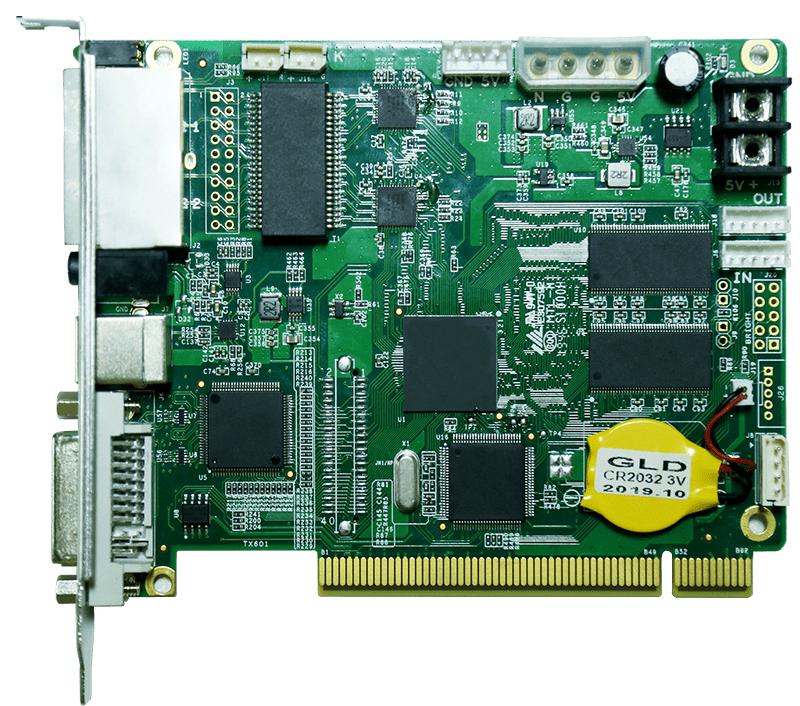
A Sending Card is a hardware device designed to capture video signals from inputs (such as HDMI, DVI, or DisplayPort) and translate them into a digital data format that can be distributed across the videotron panels via LAN cables (RJ45) or fiber optics.
Technically, this device converts standard signals from a computer or video processor into a specific communication protocol understood by the receiving cards installed in each videotron cabinet.
Key Functions of a Sending Card
-
Signal Conversion: Converting video inputs (such as HDMI format) into efficient serial data signals for long-distance transmission over cables.
-
Resolution Scaling: Adjusting the screen capture area (mapping) to match the actual pixel count of the videotron.
-
Data Distribution: Sending visual instructions to multiple cabinet paths simultaneously to ensure the display is synchronized and lag-free.
-
System Configuration: Through supporting software (such as NovaLCT or similar), the sending card is used to adjust brightness, color calibration, and cabinet layout.
Types of Sending Cards by Form Factor
-
Internal (Synchronous Card): Shaped like a graphics card and installed directly into a computer's PCI slot or inside a video processor unit.
-
External (Sending Box): A standalone unit with its own casing. It is highly flexible as it can be connected to various input devices without the need to open a computer chassis.
Why Choosing the Right Sending Card is Vital
Selecting a sending card shouldn't be done haphazardly. The loading capacity or the number of pixels a single card can handle is strictly limited. If your videotron has a 4K resolution but you only use a standard sending card, the image will not be displayed fully or may fail to appear entirely.
Furthermore, data transmission quality relies heavily on this component. A high-quality sending card ensures there is no flicker or signal interference, even when sending data to a massive screen.
FAQ
-
Is one sending card enough for a large videotron?
It depends on the resolution. Every sending card has a maximum pixel loading capacity. If your videotron's pixel count exceeds the card's capacity, you will need to add more units or use a higher-spec series. -
What is the difference between a Sending Card and a Video Processor?
A Video Processor processes the input source (scaling, switching, PIP), while the Sending Card is the tool that delivers those processed results to the screen. Nowadays, many video processors come with integrated sending cards. -
What happens if the Sending Card malfunctions?
The entire screen or a large portion of it will typically go black or show a No Signal error, as the central data distribution hub has been interrupted.
Optimize Your Videotron Visuals With Us
Understanding the right sending card specifications for your screen resolution is the first step toward avoiding technical issues in the future. Don't let your display investment be hindered by the wrong choice of control components.
Contact us for a consultation regarding videotron control systems or hardware upgrades. We are ready to provide the best solutions tailored to your specific needs.